How to Deposit Bitcoin via Lightning Network
How to Deposit at a Crypto Casino Using Lightning Network
If you have ever deposited Bitcoin at a casino, waited 25 minutes for a confirmation, and missed the line you wanted to bet, you already understand the problem Lightning solves. On-chain Bitcoin works, but it was never designed for the pace of live betting or fast-paced games where waiting half an hour to fund your account is a dealbreaker before you even place a wager.
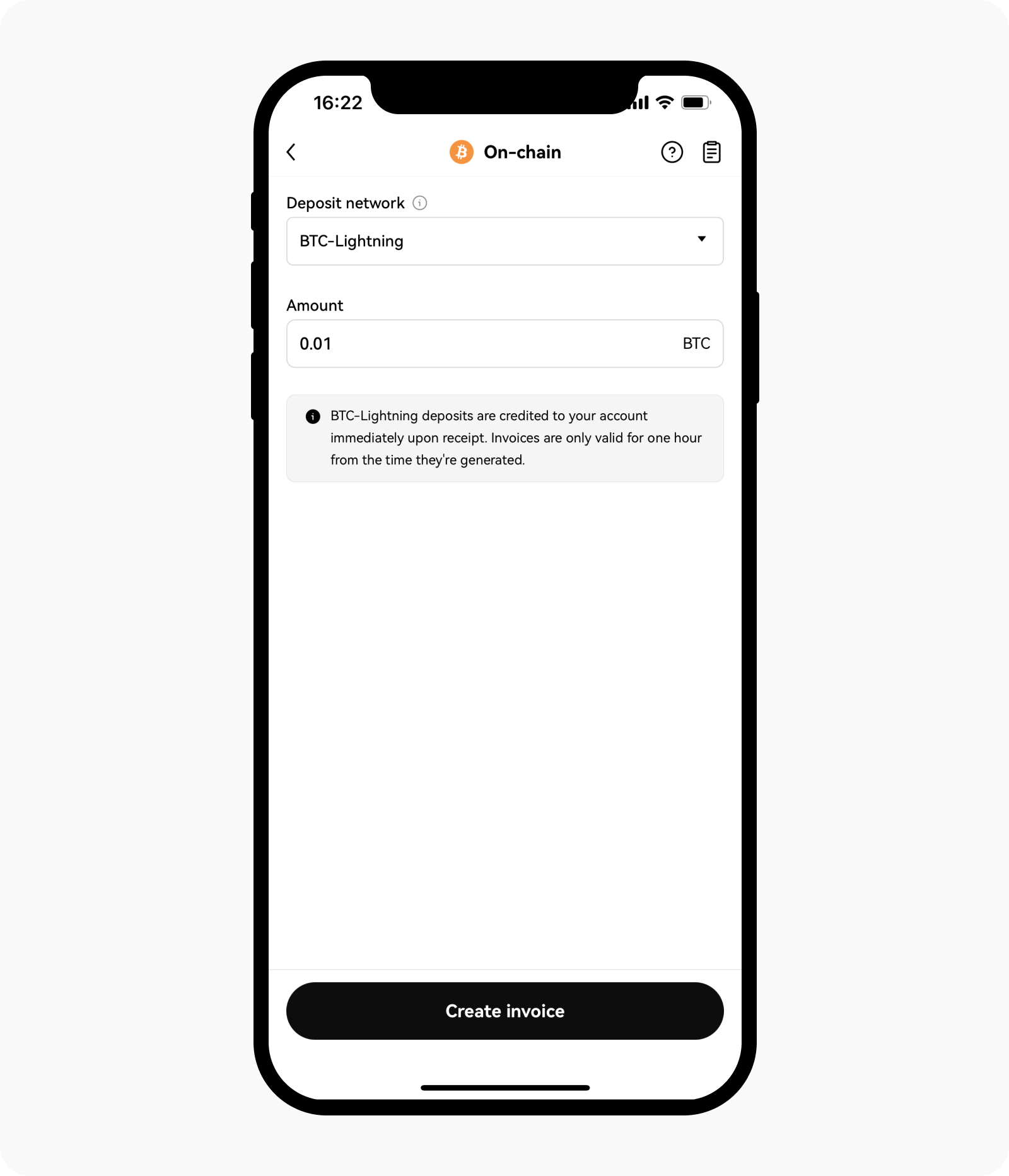
Lightning Network deposits land in seconds. Fees are fractions of a cent. You do not wait for blockchain confirmations. This guide explains how it works, how to set up a wallet, and how to actually complete a deposit without running into the common pitfalls.
What the Lightning Network Actually Is
Lightning is a layer-2 protocol built on top of Bitcoin. The base Bitcoin blockchain settles about 7 transactions per second globally. That ceiling was fine when Bitcoin was a niche experiment, but it creates real congestion as adoption grows, and congestion drives fees up and confirmation times out.
Lightning's solution is to move most transactions off-chain. Two parties open a payment channel between them by locking funds on the Bitcoin blockchain. Once that channel is open, they can transact back and forth instantly without touching the main chain. When they are done, they close the channel and settle the final balance on-chain. In the meantime, every transaction between them is immediate and costs essentially nothing.
The network works because channels connect to each other. You do not need a direct channel with every person you want to pay. Lightning finds a route through existing channels, the same way a payment hops through intermediary banks in the traditional system, but without the delays.
A useful mental model: think of a bar tab. You open a tab at the start of the night (open a channel), buy drinks throughout the evening (send Lightning payments), and settle the total when you leave (close the channel and post the final balance to the Bitcoin blockchain). Every individual drink purchase is instant because it is running on the tab, not processing through a payment terminal each time.
For casino deposits, this means: no waiting. The casino generates an invoice, you pay it from your wallet, and your balance is credited before you have finished putting your phone away.
Why Lightning Matters for Casino Deposits
The practical differences between Lightning and on-chain Bitcoin come down to three things: speed, cost, and minimum viable deposit size.
Speed. An on-chain Bitcoin deposit requires at least one blockchain confirmation. During normal network conditions, that is 10 to 30 minutes. During congestion events (typically when Bitcoin's price is moving sharply and everyone is transacting), confirmation times can push past an hour. Lightning deposits settle in 3 to 10 seconds. For live betting, where a line might move or close entirely during a 20-minute confirmation window, this is not a minor inconvenience.
Cost. Bitcoin on-chain fees are determined by supply and demand for block space. In calm conditions, fees hover around $1 to $3 per transaction. When the network is congested, $15 to $20 fees are common, and during extreme events the number can go higher. Lightning fees are set by the routing nodes along the payment path, but in practice they come out to well under a cent on typical casino deposit amounts.
Micro-deposits. If you want to top up your casino account with $10, doing it on-chain might cost $3 in fees, which is a 30% overhead before you have played a single hand. Lightning makes small deposits completely practical. You can move $5, $10, or $20 into your account without the fee eating a meaningful chunk of it.
The one thing Lightning is less suited for: very large transfers. A $5,000 deposit routed through Lightning can run into issues finding a path with enough capacity. For large amounts, on-chain is more reliable. For typical deposit amounts of a few hundred dollars or less, Lightning is the better option in almost every scenario.
For more context on how crypto casinos handle deposits and withdrawals compared to traditional platforms, see our breakdown at crypto casino vs. traditional casino.
Step-by-Step Deposit Process
1. Get a Lightning Wallet
Most Bitcoin wallets do not support Lightning. You need one that does. Here are the most commonly used options:
| Wallet | Type | Best For | Platform | |--------|------|----------|----------| | Phoenix | Non-custodial | Regular users who want control | iOS, Android | | Muun | Non-custodial | Flexibility (handles both on-chain and Lightning) | iOS, Android | | Wallet of Satoshi | Custodial | Beginners, fastest setup | iOS, Android | | BlueWallet | Custodial Lightning | Users who also need on-chain | iOS, Android | | Breez | Non-custodial | Simple, clean interface | iOS, Android | | Zeus | Non-custodial | Advanced users connecting their own node | iOS, Android |
A quick word on custodial versus non-custodial: custodial wallets (Wallet of Satoshi, BlueWallet's Lightning mode) hold your keys on their servers. You do not manage payment channels yourself, and setup is essentially just downloading the app and depositing. The tradeoff is that you are trusting the wallet provider. Non-custodial wallets (Phoenix, Muun, Breez, Zeus) put you in control of your own keys and channels. More responsibility, more sovereignty.
For casino deposits specifically, custodial is a perfectly reasonable choice. You are about to send the money to a casino anyway, so the extra control of a non-custodial wallet is less critical here than it would be for long-term Bitcoin storage. If you want the easiest possible experience, Wallet of Satoshi is the fastest to set up and has excellent routing reliability.
2. Fund Your Lightning Wallet
Once you have a wallet, you need to get Bitcoin into it.
The standard path: buy Bitcoin on an exchange (Coinbase, Kraken, and Gemini are common options), then send BTC to your Lightning wallet's on-chain address. Every Lightning wallet has one. This triggers an on-chain Bitcoin transaction, which means you will wait 10 to 30 minutes for confirmation. This is the one-time on-chain wait you cannot avoid.
After your funds arrive in the wallet, Phoenix and Muun automatically open a Lightning channel for you during this process. You may see a small channel-opening fee deducted. This is normal and a one-time cost for Phoenix users. Once the channel is open, you are ready.
Some wallets (Wallet of Satoshi, Muun) let you buy Bitcoin directly within the app using a card, which simplifies the process but typically involves a higher purchase fee.
3. Go to the Casino's Deposit Page
Not every casino supports Lightning. The ones that do include Stake, BC.Game, Cloudbet, and Shuffle. BitStarz, as one example of a holdout, currently only accepts on-chain Bitcoin. Check the deposit section of your chosen casino before you go through the wallet setup process.
In the cashier, look for "BTC (Lightning)" or a lightning bolt icon next to the Bitcoin option. This is important: do not select the regular "BTC" option, which will give you an on-chain Bitcoin address. That is a completely different method and the funds will not route correctly if you pay one with the other.
4. Scan or Copy the Lightning Invoice
When you select the Lightning deposit option, the casino generates a Lightning invoice. It looks like a long string of characters starting with lnbc. The casino displays this as a QR code and as plain text.
You have two options: scan the QR code with your wallet app's camera, or copy the text string and paste it into the wallet manually. Either works. Scanning is faster if you are on a different device. Copy-paste is easier if your wallet and the casino are both on the same device.
Important: Lightning invoices expire. The time limit is set by the casino and is usually between 30 and 60 minutes. If you copy an invoice, pay it promptly. An expired invoice will fail, and you will need to generate a new one.
5. Confirm and Send
Your wallet displays the payment details: the amount (denominated in satoshis or the equivalent in your local currency), the destination (the casino), and the fee (fractions of a cent on typical amounts). Review them, confirm, and send.
The payment routes through the Lightning network automatically. The casino credits your account within seconds. No further confirmation steps, no waiting for blockchain confirmations, no refresh-the-page-hoping.
Withdrawals via Lightning
Withdrawals work in reverse. You initiate them from the casino's cashier rather than from your wallet.
In the cashier, select Lightning withdrawal and enter the amount you want to withdraw. The casino asks for a Lightning invoice from your wallet. Open your wallet, navigate to the receive function, generate a new invoice for the amount you want, and copy it. Paste that invoice into the casino's withdrawal form and confirm.
Funds arrive in your wallet within seconds, the same as deposits.
Two things to keep in mind. First, your wallet needs to be online when the payment arrives. Lightning requires your wallet to be active to receive. If your phone is off or the app is closed, the payment may fail and the casino will return funds to your account. Second, your wallet channel needs enough inbound capacity to accept the incoming payment. If your channel is saturated with outbound funds and has no inbound room, a large withdrawal may not go through.
Phoenix handles inbound liquidity automatically but may charge a small fee to open a new channel when needed. Wallet of Satoshi handles this entirely for you on the custodial side. If you are on a non-custodial wallet and running into receiving issues, switching to a custodial wallet like Wallet of Satoshi is the quickest fix.
Troubleshooting Common Issues
Payment Fails to Route
Lightning payments travel through a path of connected nodes. If there is no path with enough liquidity between your wallet and the casino's receiving node, the payment fails. This happens more often with larger amounts, typically over $500, where finding a fully liquid path is harder.
The first thing to try is a different wallet. Custodial wallets like Wallet of Satoshi maintain better general connectivity because they are large hubs with well-established channel relationships. If your non-custodial wallet fails to route, a custodial one often succeeds on the same payment.
If the amount is large, consider splitting it into two or three smaller deposits. A single $600 deposit may fail to route while three $200 deposits go through without issue.
Invoice Expired
Invoices have a time limit, and once it expires, the invoice is no good. Do not try to pay an expired invoice. Generate a fresh one from the casino's deposit page and pay promptly this time. If you are doing this from a computer with the casino on one screen and your wallet on another, the whole process takes under a minute.
Withdrawal Will Not Go Through
The most common cause is inbound liquidity. Your wallet's Lightning channel has two sides: your balance (funds you can send) and inbound capacity (room to receive). If you have sent a lot of payments and not received any, your inbound capacity may be near zero.
Phoenix resolves this by opening a new channel automatically, with a small fee. Wallet of Satoshi handles it transparently in the background. If you are stuck, switching temporarily to Wallet of Satoshi for the withdrawal is a reliable workaround. As a last resort, request an on-chain withdrawal from the casino instead. It takes longer, but it always works.
Wrong Network
This one is worth being explicit about because the consequences can be severe. If you send on-chain Bitcoin to a Lightning invoice address, or attempt to pay a Lightning invoice from a regular Bitcoin wallet, the transaction may fail entirely or the funds may be lost with no recovery path.
Always verify which deposit method you selected in the casino's cashier before you scan or copy anything. Lightning invoices start with lnbc. On-chain Bitcoin addresses start with bc1 (native SegWit), 3 (wrapped SegWit), or 1 (legacy). They look completely different, so if you are ever unsure, just check the first few characters.
Lightning vs. On-Chain: When to Use Each
| Scenario | Use Lightning | Use On-Chain | |----------|--------------|--------------| | Quick deposit under $500 | Yes | Overkill | | Large deposit ($1,000+) | Possible but routing may fail | More reliable | | Casino does not support Lightning | N/A | Only option | | You want a permanent blockchain record | No (off-chain) | Yes | | Fee-sensitive deposit | Yes (fractions of a cent) | No ($1-$20) | | Time-sensitive (live betting, crash) | Yes (seconds) | No (10-30 min) | | Micro-deposit under $20 | Yes | Fees make it impractical |
The short version: for typical casino use, Lightning is almost always the right choice. The only reasons to default to on-chain are a very large deposit, a casino that does not support Lightning, or a specific need to have the transaction recorded on the Bitcoin blockchain.
Security Considerations
Lightning is secure. The protocol uses the same cryptographic foundations as the Bitcoin network itself, and for the amounts involved in normal casino deposits, the security model is more than adequate.
A few practical notes worth keeping in mind.
Custodial wallets are convenient but mean trusting the wallet provider with your funds. For money you are about to deposit at a casino anyway, this is an acceptable trade. Do not keep your entire Bitcoin savings in a custodial Lightning wallet.
Non-custodial wallets give you direct control of your keys. If your phone is lost or damaged and you have not backed up your seed phrase, you could lose access to your funds. Back up your seed phrase during wallet setup and store it somewhere safe. This applies to custodial wallets too, even though some do not use traditional seed phrases; follow whatever backup process the app provides.
Do not keep more in your Lightning wallet than you plan to use. The Lightning wallet is your gambling wallet, not a savings account. Keep the rest of your Bitcoin in cold storage. This is standard practice for anyone managing their own keys, and it limits exposure if anything goes wrong.
For broader thinking on how to budget your gambling funds and how much to keep accessible versus in reserve, the principles in our bankroll management guide apply directly to how you structure your Lightning wallet funding.
The Bottom Line
Lightning Network deposits are genuinely better than on-chain Bitcoin for casino use in almost every practical scenario. The speed difference, the fee difference, and the ability to make small deposits without watching fees eat a significant portion all point in the same direction.
The setup takes a few minutes: download a wallet, fund it, and you are ready. For first-time users, Wallet of Satoshi gets you there fastest with the least friction. For users who want more control, Phoenix handles channel management automatically while keeping your keys on your own device.
Once your wallet is set up and funded, depositing via Lightning is faster than depositing via card at a traditional casino, and considerably faster than any on-chain crypto method. That speed, combined with near-zero fees, is why Lightning has become the preferred deposit method for active players at casinos that support it.
FAQ
What is a Lightning Network deposit?
Lightning Network is a layer-2 protocol on Bitcoin that enables near-instant, low-fee transactions. Casino deposits arrive in 3 to 10 seconds instead of the 10 to 30 minutes required for on-chain Bitcoin confirmations, and fees are fractions of a cent.
Which crypto casinos accept Lightning deposits?
Stake, BC.Game, Cloudbet, and Shuffle all accept Bitcoin deposits via Lightning Network. BitStarz currently supports on-chain Bitcoin only. Look for "BTC (Lightning)" or a lightning bolt icon in the casino deposit section.
What is the best Lightning wallet for casino deposits?
For beginners, Wallet of Satoshi is the easiest (custodial, instant setup). For users who want control of their keys, Phoenix is the best option (non-custodial, automatic channel management). Muun offers flexibility with both on-chain and Lightning from one wallet.
Why did my Lightning payment fail?
Lightning payments can fail due to routing issues (especially for amounts over $500), expired invoices (they typically last 30 to 60 minutes), or insufficient channel liquidity. Try a smaller amount, generate a fresh invoice, or switch to a custodial wallet with better network connectivity.
Last updated: March 2026